A quotation leaves the sales inbox on Tuesday. The customer asks for a call later in the week. By Monday, the salesperson has handled several new enquiries, the manager assumes the deal is progressing and the next action is still sitting in a private chat.
The missing piece is a dependable handover from customer interest to the next agreed action. Zoho CRM automation can make that handover visible, while Zia AI can assist with prioritisation and preparation.
Zoho CRM automation helps sales teams assign ownership, create due tasks, run contact sequences and surface overdue work. A useful system also stops or changes the sequence when the customer replies, books a meeting, opts out or asks to be contacted later.
This guide explains seven steps to build that system for a business in Dubai or elsewhere in the UAE. You will find a sample quotation sequence, practical Zia AI use cases and the measures that reveal whether the process is working.
In this guide
Build the follow-up foundation first, then add useful AI assistance and measure outcomes.
What is Zoho CRM automation?
Zoho CRM automation uses configured rules and processes to assign records, create tasks, send notifications and manage follow-up sequences. Zia AI can add scoring, summaries or writing assistance where available. The rules define what should happen; the team remains responsible for checking context, handling exceptions and recording the next customer commitment.
Why sales follow ups get missed
Before configuring Zoho CRM automation, identify the missing decision. Who owns the enquiry? When is the next action due? What counts as a completed follow-up? Who steps in if the owner is absent?
A spreadsheet may show “contacted” without recording the customer’s request. A task may be marked complete after an unanswered call, leaving no next attempt. A shared inbox may show an email was sent, while the actual deal owner never sees the reply.
Start by examining a small sample of stalled opportunities. Record where each one lost momentum. This is more useful than creating reminders for every sales stage and hoping the important alerts stand out.
Which Zoho CRM tool should handle the follow up
Zoho CRM automation includes several tools with different jobs. Use them deliberately, and check availability and limits in your subscription before configuration.
Requirement
Tool to evaluate
Design decision
Route incoming records to a responsible person
Assignment Rules
Which entry routes invoke the rule?
Create a task or notification when a condition is met
Workflow Rules
What event or date triggers the action?
Run a sequence of emails, calls and tasks
Cadences
What enrols the record, and what stops it?
Require information at a sales transition
Blueprint
What evidence must be entered before progressing?
Show the work that needs intervention
Reports and dashboards
Who reviews the queue and acts on exceptions?
Use workflows for specific events
Workflow Rules can trigger actions when defined conditions are met. They support instant and scheduled actions, making them useful for creating a task after a meaningful event such as a quotation being issued. Zoho’s workflow tutorial explains the trigger, condition and action structure.
Define the event precisely. “Quotation sent” should mean the intended quotation has been delivered through the agreed process—not merely that someone has moved a stage forward to tidy the pipeline.
Use Cadences for a contact sequence
Cadences is designed for sequential follow-ups. Zoho documents email, call, task and WhatsApp follow-up options, with enrolment and un-enrolment controls. Channel availability and configuration still need checking in the actual account. See the Cadences configuration guide.
A series has a different job from a single reminder. It needs decisions about spacing, relevance, responses and when to stop. A customer asking for a revised quote should leave the generic “no reply” sequence and enter a process owned by the salesperson.
Use Blueprint to improve the handover
Blueprint can require information during a process transition. For example, a sales team can require the next action and the customer’s agreed date when moving a deal into a follow-up stage. Zoho’s Blueprint design documentation explains transition owners, criteria and mandatory fields.
This improves the recorded handover, but entering a note does not prove that a meaningful conversation happened. Keep the required information short and make managers review the quality of outcomes, not just field completion.
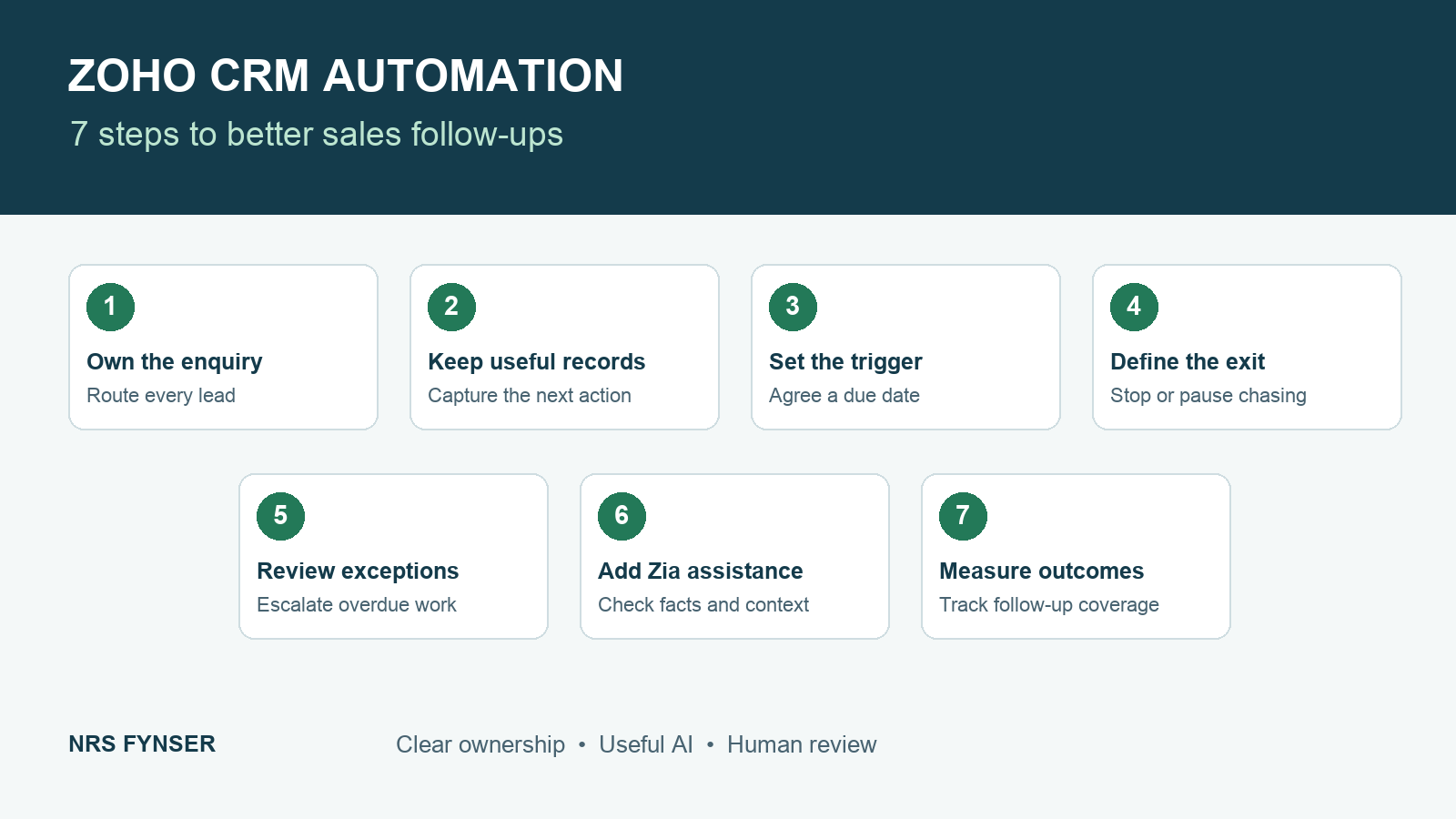
Build the foundation first: ownership, reliable records, meaningful triggers, exit rules and manager visibility. Then add AI assistance and measure the result.
Step 1 Define ownership before Zoho CRM automation
List the ways enquiries enter the CRM: website forms, imports, connected applications, manually entered calls, event leads and walk-ins. For each route, define an owner, a fallback and a way to detect assignment failure.
Zoho documents an important limitation: Assignment Rules do not trigger for manually created records. Its FAQ identifies imports, webforms and API entry as supported routes. Therefore, manually entered enquiries need an explicit ownership process, and integrations must be tested to confirm the intended rule is applied. Read the Assignment Rules FAQ.
For a UAE company, routing criteria might include product, branch, language preference or account relationship. Avoid using location alone if the customer’s existing account manager should retain responsibility.
Step 2 Agree the minimum follow up record
Zoho CRM automation depends on a small set of fields that helps someone else understand the next action. The following is a proposed design; these labels are not a claim that every field already exists in Zoho CRM.
Field
Why it matters
Responsible owner
Gives one person accountability
Next action due
Makes the deadline visible
Next action type
Distinguishes a call, proposal, meeting or internal check
Last meaningful contact
Separates customer interaction from administrative edits
Latest outcome
Records what happened and what the customer needs
Preferred channel and contact time
Helps the team respect customer preferences
Pause reason and resume date
Makes a delayed opportunity reviewable
Define “meaningful contact” carefully. An internal note, bulk field update or email open should not automatically erase a missed callback. Decide which events update the field, then test that behaviour across every channel your team uses.
Step 3 Choose a trigger and a due date
Begin your Zoho CRM automation setup at the point where your sample showed the clearest gap. If quotations routinely stall, trigger the follow-up process from the verified quotation event. If enquiries sit untouched, start with the first-response process.
Distinguish elapsed time from working time. “Three days later” and “three working days later” can produce different results. Document the intended calendar, office hours and exceptions before selecting the available configuration.
Zoho’s workflow configuration documentation describes scheduled actions and their timing. Check the exact trigger and action you plan to use rather than assuming an inactivity condition is monitored continuously.
Step 4 Add stop and pause conditions
Your Zoho CRM automation setup should explain when it must change direction. Define these conditions before composing the messages:
The customer replies and a rep takes ownership of the next step.
A meeting or callback is agreed.
The opportunity is won, lost or disqualified.
The customer opts out or the channel is unsuitable.
The customer requests a later date.
The record duplicates an active opportunity already being handled.
Configure and test the applicable exit paths. Zoho’s Cadences documentation warns that a record leaving a custom view does not necessarily stop its sequence unless the relevant un-enrolment condition is configured. Treat a reply, stage change and opt-out as separate test cases rather than assuming they behave identically. Review Cadences un-enrolment behaviour.
Step 5 Give managers an exception queue
Zoho CRM automation also needs a manager who reviews situations requiring a decision: unassigned enquiries, overdue actions, absent owners and opportunities with no next step. Assign responsibility for reviewing that queue at a frequency appropriate to your response commitments.
An escalation should produce an action. Notify the manager with the customer context and the decision needed. Repeated alerts without an owner or escalation path create another inbox to ignore.
A sample quotation follow up sequence for a UAE business
The following is an illustrative starting design for a B2B enquiry. The timing is a proposed business policy, not a Zoho default or an industry benchmark. Adjust it to the customer’s request, sales cycle and permitted communication channels.
Point in the process
Suggested action
Condition to check first
Quotation issued
Record the version, owner and next agreed action
Has the quotation actually been sent?
Two working days later
Ask whether the customer needs clarification
Has there been a reply, booking or request to wait?
Five working days later
Create a call task for the owner
Is the opportunity still active and contact appropriate?
Seven working days later
Ask the owner to review the opportunity
Is there a meaningful next step or a reason to pause?
After a customer reply
End generic chasing and assign the requested action
Has the new commitment and due date been recorded?
For a Sharjah distributor, a reply may ask for updated stock availability. That calls for an internal stock check and a revised proposal, not another automated “just following up” email. For a Dubai services business, the next action may be a scope meeting with finance and operations.
One useful message is: “Following up on quotation [reference] for [requirement]. Would you like us to clarify the scope, revise the proposal, or arrange a short call?” The salesperson should check the context and replace the placeholders before sending it.
UAE details that make the process useful
Set contact timing for the actual customer
Use the appropriate organisation time zone and confirm how scheduled actions behave. A UAE office can sell to customers in several countries; do not treat every contact as if they share the office’s calendar.
Record agreed callback times and changes to availability. Working hours, public holidays and periods such as Ramadan should be considered in the operating policy. Avoid hardcoding one assumption for every team and customer.
Design English and Arabic communication deliberately
Capture language preference where it helps the service. Have a competent reviewer approve Arabic and English templates, including product terminology, tone and commercial commitments. Do not automatically choose a language from a person’s name or nationality.
A translated template is useful only if the team can also handle the reply. Assign a route for enquiries that require a different language or specialist knowledge.
Treat WhatsApp as a configured channel
Zoho documents WhatsApp options within Cadences, but a customer’s number in the CRM does not establish that messaging is ready. Verify the supported integration, sender setup, permissions and applicable template or messaging requirements before adding the channel to a sequence. The Cadences FAQ is a starting reference.
Record relevant outcomes in the CRM so that a reply handled in another channel does not leave an email sequence chasing the same person. Include this in the rollout tests.
Keep the sales and finance handover visible
For a deal involving a deposit, purchase order or booking, define which team owns the next step and which system holds the authoritative status. A sales stage labelled “won” should not silently stand in for money received or stock reserved.
Test Zoho CRM automation with sample records and document the expected result. Include a new web enquiry, a manually entered lead, an existing customer, a duplicate, an owner who is unavailable, an early reply, a booked meeting, an opt-out and a request to wait.
Also test what happens when a quotation is revised, a deal is reopened or the customer’s reply arrives through another channel. Look for duplicate tasks, stale messages, incorrect ownership and actions scheduled outside the intended working window.
A successful test demonstrates that the right action happens and that irrelevant actions stop. Starting a workflow is only half the process.
Step 6 Use Zia AI where it improves the next action
Rules make the process dependable. AI can help a rep interpret the information within it. Choose one use case with a clear owner and check its availability before adding it to the follow-up process.
Follow-up problem
Zia capability to evaluate
Human check
A busy queue needs prioritisation
Zia Scores
Review relevant opportunities across the queue, including lower-scored leads.
A rep needs the customer’s context
Record or email summaries
Check the latest request, dates and commitments against the source.
A customer email needs a quick response
Email intelligence and writing assistance
Verify intent and commercial details before sending.
Calls repeatedly miss the customer
Best Time to Contact
Respect the customer’s agreed appointment and preferences.
These are distinct capabilities rather than one universal AI switch. Zoho’s CRM AI overview explains scoring, summaries, communication assistance and other features. Check the edition matrix for the features your process needs.
A practical example for a Dubai sales team
Imagine a services business with several open proposals. A rep uses an available summary feature to prepare for a call, checks the customer’s latest email and drafts a reply addressing the actual question. The rep verifies scope, dates and pricing, then records the next agreed action. The CRM sequence changes accordingly instead of continuing generic chasing.
This is an illustrative operating design, not a measured client result. Judge the pilot by preparation time, factual corrections and how quickly the customer’s next request reaches the responsible person.
Check data availability and language support
Prediction tools need suitable historical data. Zoho specifies at least 200 records matching the learning criteria for its field prediction algorithm, with additional requirements for picklist values. That threshold belongs to field prediction; it is not a minimum for every AI feature. Read the prediction specifications.
Language support also differs by capability. Zoho’s Email Intent page lists English, German, Spanish and French; Arabic is not listed. Test English, Arabic and mixed-language messages separately rather than assuming translation and intent analysis have identical support. Check Email Intent availability.
For generative assistance, Zoho’s Models FAQ currently lists US, EU, IN, AU, CA and JP data centres. A UAE office does not establish which data centre hosts its CRM organisation. Confirm the actual account, enabled model, access settings and integration requirements before promising a capability. Check the Models FAQ.
Start with reviewed drafts and recommendations. Keep a person responsible for customer-facing prices, commitments and sensitive issues. If reliable ownership and follow-up records are missing, fix those foundations before expanding the AI pilot.
Step 7 Measure follow up coverage and outcomes
Measure
Suggested definition
Next action coverage
Active opportunities with an owner and valid next action divided by all active opportunities
Overdue action rate
Overdue open follow-up tasks divided by open follow-up tasks
First meaningful response time
Time from enquiry capture to the first relevant human response
Reply handover time
Time from a customer reply to an assigned next action
Sequence exception count
Duplicate, inappropriate or incorrectly continued actions found during review
Use these proposed measures to evaluate Zoho CRM automation. Decide the exclusions, reporting period and whether time is measured in working hours. Compare similar lead sources and stages so changes in lead mix do not masquerade as improved performance.
If next action coverage increases while customer replies wait untouched, the system still has a gap. Review outcomes and queue quality alongside the numbers.
Questions about Zoho CRM follow up automation
Can Zoho CRM send automatic follow up emails
Yes. Depending on the required process and account configuration, workflows or Cadences can support automated follow-up emails. Define recipients, timing, entry criteria and exit conditions, and test the sequence before use.
What is the difference between Cadences and workflows
Workflows handle actions triggered by defined events or conditions. Cadences manages a sequence of customer follow-ups. Use the tool that fits the process rather than forcing every sequence into a collection of unrelated reminders.
Will a workflow automatically detect every inactive lead
Do not assume so. Define the relevant inactivity event or field, the evaluation mechanism and the scheduled action. Test whether logged activity, a reply or a changed stage affects pending actions as intended.
Does a small team need AI to automate follow ups
No. Clear ownership and correctly configured rules can provide the foundation. AI can then assist with prioritisation or preparation where useful. Use the Zia selection guidance above to choose a focused pilot.
Which Zoho CRM edition should we choose
List the required actions, Cadences limits, Blueprint needs, integrations and reporting before choosing. Compare them with the current Zoho CRM edition matrix and verify the configuration in your account.
Build a follow up process your team can use
NRS Fynser helps businesses configure Zoho CRM automation around actual lead sources, sales stages and team responsibilities, with relevant AI assistance where the account and data support it. The work can include process mapping, ownership rules, workflows, sequences, dashboards, migration and user training.
Contact NRS Fynser with a few examples of enquiries or quotations that stalled. We can review where the next action became unclear and scope a practical follow-up process for your team.
Product documentation checked on 13 October 2026. The sequence, fields and measures in this article are proposed designs, not client performance claims or default product settings.
Zoho Implementation in Dubai: 8 Steps to Smarter Operations
Zoho implementation in Dubai works best when the system follows the way your business actually operates. A sales team may close a deal in CRM, but finance still needs the right customer, invoice and payment terms. Operations needs an accurate order or project record. Management needs one reliable view of what happened. When those handoffs depend on spreadsheets and repeated data entry, small mistakes travel across the business.
At NRS Fynser, we help UAE businesses connect those steps through Zoho. As a Zoho Advanced Partner, our team combines application expertise with accounting, finance and business-process knowledge. The goal is a practical system your people can use every day, whether you are starting from scratch, moving from Tally or spreadsheets, or improving an existing Zoho setup.
This guide explains eight steps to a successful Zoho implementation in Dubai, from process mapping to training and ongoing optimisation.
What a connected Zoho system can do
Zoho is a suite of applications, so implementation is more than turning on one product. A useful setup can connect Zoho CRM for sales, Zoho Books for accounting, Inventory for stock and fulfilment, Projects and Expense for delivery costs, and Analytics for management reporting. Forms, Desk, Sign, WorkDrive, Cliq and People can support other parts of the workflow when they solve a specific need.
The right combination depends on your business model. A real estate company may need lead-to-booking and broker management. A distributor may care more about landed cost, replenishment and receivables. A logistics team may need enquiry-to-shipment visibility. Start with the process, then choose the apps.
Zoho implementation in Dubai: eight practical steps
1. Map the work before configuring software
Document how a lead becomes a customer, how a quote becomes an invoice, how purchases are approved and how management receives reports. Identify who owns each handoff and where data is entered more than once. This gives the project a clear scope and reveals exceptions that a standard demo may miss.
For example, a real estate team may route leads by project and agent, prepare an offer, record a booking, generate a payment schedule and then pass the customer to finance. Each step needs a named owner and an agreed record of truth.
2. Design the Zoho architecture and access rules
Decide which application owns customers, items, deals, projects and financial transactions. Design the modules, custom fields, layouts, pipelines, blueprints and approval paths before building them. Define access by role so each team sees the information it needs and sensitive records are handled appropriately.
In Zoho CRM, this may include leads, contacts, accounts, deals, broker and agent records, lead assignment, round-robin routing, reminders and sales dashboards. A clear data model prevents conflicting fields and duplicate customer records later.
3. Clean and migrate the starting data
Migration from spreadsheets, Tally or another platform is a chance to improve data quality. Review customers, vendors, items, chart of accounts, opening balances and active deals. Remove duplicates, agree naming rules and map each source field to its destination. Reconcile finance balances before go-live rather than assuming the import is correct.
We recommend a test migration first, with sample records checked by the people who will use them. That exposes missing fields, ownership gaps and incorrect balances while changes are still easy to make.
4. Configure sales and customer workflows
Build CRM around the real sales cycle. Define stages, required information, follow-up tasks, notifications, approval steps and reporting. Use blueprints where a team needs a guided process; use automation where it removes repetitive work without hiding exceptions.
Depending on the business, this can include lead-to-booking journeys, unit and project records, broker management, sales agreements, booking forms, offers and customer handover. Dashboards should show pipeline quality and conversion, not just a count of deals.
5. Connect accounting, inventory and project costs
Configure Zoho Books with an appropriate chart of accounts, customer and vendor records, quote-to-invoice flow, payment tracking, bank reconciliation and VAT reporting. Align custom fields and templates with the records your teams need. If advances or part payments are common, design the receipt and validation workflow explicitly.
Where stock matters, Zoho Inventory can support multi-location stock, purchasing, RFQs, vendor comparison, reorder controls, serial or batch tracking, landed costs and fulfilment. Projects and Expense can link tasks, claims, budgets and costs to a customer or project, giving finance and operations a shared view.
6. Automate handoffs and integrate other systems
Once the core records are reliable, connect them. CRM-to-Books synchronisation can reduce manual customer and deal entry. Zoho Flow, custom functions and APIs can support approvals, document generation, e-signature, payment validation and notifications. Integration may also be needed with SAP, Power BI, marketplaces, courier services or payment platforms.
Automation should have clear rules for duplicates, failed transfers and manual exceptions. Test those cases as carefully as the normal path; otherwise a process that looks fast in a demo can create reconciliation work later.
7. Build dashboards around decisions
Zoho Analytics can combine information from CRM, Books and other applications into reports that answer management questions. Useful views may cover sales pipeline, project or unit performance, customer and agent results, profit and loss, balance sheet, cash flow, inventory and purchasing.
Start with a small set of trusted KPIs. For each measure, agree its definition, source and owner. A dashboard is only helpful when the underlying data is consistent and the team knows what action a number should trigger.
8. Test, train, go live and improve
Run user acceptance tests with real scenarios: a new lead, an amended quote, a purchase approval, an advance receipt, a returned item and a month-end report. Fix gaps before go-live. Train users by role, provide simple process guides and appoint owners for data quality and future changes.
After launch, review adoption and exceptions. A useful Zoho implementation continues to improve as your sales, finance and operations processes evolve.
Where NRS Fynser brings practical experience
Our implementation work spans real estate lead-to-booking systems, unit and agent management, logistics enquiry-to-shipment processes, vendor RFQs, trading and distribution finance, multi-location inventory, CRM-to-Books automation, advance receipts, payment validations, management dashboards, document templates and user training.
As a Zoho Advanced Partner, we combine that application work with accounting and finance expertise. This helps us design workflows that make sense to both the teams entering transactions and the people reviewing financial results. We can support process analysis, solution design, configuration, migration, integration, testing, training and post-implementation optimisation.
Common mistakes to avoid
Buying and configuring apps before agreeing the process and data owner.
Importing duplicate or incomplete customer, vendor and item records.
Automating approvals without defining exceptions and escalation paths.
Building dashboards before reconciling the figures behind them.
Leaving user training until after go-live.
If you are comparing Zoho with a broader ERP approach, our article on how ERP systems improve financial reporting explains why connected data and clear controls matter as a business grows.
Frequently asked questions
How long does a Zoho implementation take?
It depends on the number of applications, data quality, integrations and approval workflows. A focused CRM or Books project is different from a business-wide rollout. A discovery and process-mapping phase is the best way to set a realistic scope and timeline.
Can Zoho replace spreadsheets or Tally?
Zoho can centralise many sales, finance, inventory and project workflows now managed in spreadsheets or Tally. The migration should include data cleaning, account mapping, opening balance reconciliation and user testing so the new system starts with dependable information.
Can Zoho CRM and Zoho Books share customer data?
Yes, the two applications can be connected. The exact fields, ownership rules and transaction flow should be designed for your process so that synchronisation does not create duplicates or accounting inconsistencies.
Do we need every Zoho application?
No. Select the applications that solve your current business needs, then add more as the process matures. A smaller well-configured system is often easier to adopt and manage.
Build a smarter business with Zoho
Zoho can do more than store contacts or record transactions. With the right implementation, it can connect sales, finance, inventory, projects and management reporting in one usable system. Talk to NRS Fynser about a Zoho solution designed around your business process.
UAE VAT supplier verification: What businesses need to verify before deducting input VAT from 1 October 2026.
By Shamil
Key point: Before deducting input VAT, a taxable person must carry out the verification measures required by FTA Decision No. 13 of 2026 for the supplier and the taxable supply, unless an applicable exception applies.
The UAE Federal Tax Authority (FTA) has introduced a structured verification framework for businesses seeking to deduct input VAT on supplies they receive. Federal Tax Authority Decision No. 13 of 2026 was issued on 22 July 2026 and takes effect from 1 October 2026.
The Decision applies for the purposes of Article 54(bis) of the UAE VAT Law and requires taxable persons to verify both the supplier and the supply before deducting input tax. The practical effect is that input VAT recovery is no longer only a matter of holding a tax invoice and accounting records. Businesses also need a documented process that demonstrates who the supplier is, whether the transaction is commercially genuine, and whether relevant risk indicators have been considered.
For finance, procurement and accounts payable teams in Dubai and across the UAE, the change has direct implications for supplier onboarding, transaction approval, payment controls, record retention and VAT return preparation.
Key facts at a glance
Item
Requirement
Decision
FTA Decision No. 13 of 2026
Issued
22 July 2026
Effective
1 October 2026
Who it applies to
A Taxable Person, meaning a person registered or required to register for VAT, in relation to supplies received before deduction of input tax
Core requirement
Verify the supplier, verify each taxable supply, document the checks and retain supporting records
Small-supply exception
Potentially available where consideration is below AED 10,000 excluding VAT, subject to the AED 100,000 supplier-level test
Enhanced supplier checks
Apply where supplies from a supplier exceed or are expected to exceed AED 375,000 over the relevant 12-month period
Why FTA Decision No. 13 matters
The Decision creates a formal due-diligence process around input VAT recovery. It is specifically issued for the purposes of Article 54(bis) of the VAT Law and focuses on verifying the validity and integrity of supplies before input tax is deducted.
The compliance burden is therefore wider than checking whether a supplier has issued a tax invoice. Businesses must establish a defensible audit trail showing that they performed the prescribed supplier-level and transaction-level checks, considered relevant red flags and retained evidence of the steps taken.
This makes supplier verification an operational control rather than a year-end or VAT-filing exercise. In many organisations, procurement, finance, accounts payable, tax and management will need to work from the same verification procedure.
UAE VAT supplier verification requirements
A supplier must be verified when the business deals with that supplier for the first time. For recurring relationships, verification is required again where the supplier has not been verified during the previous 12 months.
1. Verify the supplier's identity
Where the supplier is a natural person, the taxable person must obtain valid proof of identity, including an Emirates ID or passport, and meet the supplier in person or virtually before the supply.
Where the supplier is a legal person, the taxable person must verify the supplier's incorporation through official databases or obtain a copy of the certificate of incorporation. The incorporation details should be valid and consistent with relevant information such as the entity's name and address. The identity of the director, agent or employee authorised to represent the supplier must also be verified using valid identification.
2. Verify the address and actual place of business
The taxable person must verify that the supplier has an actual place of business. The Decision allows this to be done using appropriate electronic means or through a field visit.
The place of business should also be compatible with the nature of the activities carried out by the supplier. A physical site visit is therefore not automatically required in every case, but the business should retain evidence of how the place of business was verified.
3. Check supplier risk indicators
The Decision identifies specific risk indicators that must be considered as part of supplier verification:
The supplier changed its address more than twice during the previous 12 months.
The supplier changed key employees, including managers or the people with whom the taxable person deals, more than twice during the previous 12 months.
The supplier carried out transactions that appear disproportionate or unexpected in volume, value or nature when compared with the size and history of the supplier's business.
A red flag does not automatically mean that the supplier relationship must be rejected. However, where a listed risk indicator applies, the taxable person must retain a clear and justified explanation and be able to provide it to the FTA if requested. The explanation should be consistent with the information and evidence available to the business.
4. Apply enhanced checks above AED 375,000
Additional verification is required where the value of supplies received from a supplier exceeds AED 375,000 over the previous 12 months, or is expected to exceed AED 375,000 over the next 12 months.
In these circumstances, the taxable person must obtain from the supplier a written confirmation issued by an authorised bank in the UAE confirming that the supplier has a bank account. The bank confirmation must not contain relevant reservations or conditions and does not have to be addressed to the recipient of the supply.
The business must also review and assess publicly available reviews and media coverage relating to the supplier from reliable sources. The information should be consistent with the nature and size of the supplier's business and should not reveal indicators of suspected tax evasion.
Verification of each taxable supply
Supplier verification alone is not enough. The Decision also requires the taxable person to verify each taxable supply received or accepted before deducting the associated input tax.
General commercial assessment
The taxable person should assess the conditions of the transaction and confirm that the supplier's involvement is based on genuine commercial reasons. The transaction should make sense when viewed in the context of the parties, the goods or services involved and the business purpose of the purchase.
Payment conditions
The payment method and payment terms must be commercially justifiable. Particular attention is required where a third party is involved in making or receiving payment, or where payment is made to a bank account outside the supplier's country of incorporation. In those cases, there must be a reasonable commercial explanation that does not conflict with the evidence available to the business.
The consideration for the supply should be paid electronically. Cash payments are permitted only where there is a documented commercial reason, the payment is within the thresholds specified in applicable UAE tax legislation and the payment is easily verifiable.
Pricing, licence scope and goods verification
Businesses must consider whether prices or profit margins are commercially unjustifiable or significantly different from market conditions without a clear reason. The goods or services supplied should also fall within the supplier's ordinary activity and the activities the supplier is licensed to carry out under its commercial licence.
For goods, the taxable person must verify authenticity and origin and confirm the supplier's ownership of the goods or right to dispose of them. Where the supplier acts as an intermediary, there should be a clear and justifiable commercial explanation for the intermediary's role in the supply chain.
Three thresholds businesses should track
Threshold
Practical effect
Below AED 10,000 per supply (excluding VAT)
The prescribed verification measures may be disregarded for that taxable supply, unless the supplier-level AED 100,000 test removes the exception.
AED 100,000 per supplier over 12 months
If total supplies received from the same supplier exceed AED 100,000 over the previous 12 months, or are expected to exceed that amount over the next 12 months, the below-AED-10,000 exception does not apply.
AED 375,000 per supplier over 12 months
If supplier spend exceeds, or is expected to exceed, AED 375,000 over the relevant 12-month period, the enhanced bank-account confirmation and public-source review requirements apply.
Example: recurring invoices below AED 10,000
Assume a Dubai business receives a recurring service invoice of AED 8,500 excluding VAT every month from the same supplier. Each individual invoice is below AED 10,000, but the expected value over 12 months is AED 102,000.
Because the expected supplier total exceeds AED 100,000 over the next 12 months, the small-supply exception does not apply to that supplier relationship. This is why businesses should monitor rolling and expected supplier spend rather than looking only at the value of individual invoices.
Documentation and internal policy requirements
The Decision requires businesses to document the verification steps they take and retain supporting documents and records so that the FTA can verify that the procedures were implemented correctly.
Businesses must also maintain a documented policy identifying the people responsible for implementing, reviewing and supervising the verification procedures. Their powers and responsibilities should be clearly stated, and the policy should be retained at the designated location used for required records.
A practical compliance file may therefore include supplier identity and incorporation documents, evidence of place-of-business checks, red-flag reviews, written explanations for exceptions, bank confirmations where applicable, transaction approvals, payment evidence and supporting documents for pricing, goods or intermediary arrangements.
What UAE businesses should do before 1 October 2026
Businesses should use the period before implementation to convert the Decision into a workable internal control process. Priority actions include:
Create a written supplier and supply verification policy with clear ownership, review and approval responsibilities.
Segment the supplier master using rolling 12-month spend and expected future spend to identify suppliers approaching AED 100,000 and AED 375,000.
Update supplier onboarding so identity, incorporation, representative details and place-of-business evidence are collected and retained consistently.
Build transaction-level checks into purchase approval and accounts payable workflows before input VAT is claimed.
Create an exception process for unusual pricing, third-party payments, overseas bank accounts, cash payments, intermediaries and listed supplier risk indicators.
Maintain a central evidence repository so documents can be retrieved quickly if the FTA requests support.
Introduce a 12-month supplier re-verification control and assign responsibility for monitoring upcoming review dates.
Common implementation mistakes to avoid
The most common risk is treating the new rules as a one-time supplier onboarding exercise. The Decision requires both supplier verification and supply-level verification, and it also introduces recurring and threshold-based obligations.
Assuming that holding a valid tax invoice is, by itself, sufficient evidence for the new verification framework.
Applying the AED 10,000 exception invoice by invoice without checking the AED 100,000 supplier-level test.
Tracking only historical supplier spend and ignoring expected spend over the next 12 months where the Decision requires a forward-looking test.
Failing to document the commercial rationale for third-party payments, overseas payment accounts, cash transactions or intermediary arrangements.
Completing checks but not retaining evidence in a form that can be retrieved and reviewed later.
Leaving the process entirely with the VAT return preparer instead of embedding controls earlier in procurement and accounts payable.
Frequently asked questions
When does FTA Decision No. 13 of 2026 take effect?
The Decision takes effect on 1 October 2026.
Who needs to comply with the Decision?
It applies to a Taxable Person – a person registered or required to register for VAT – in relation to verifying supplies received before deducting input tax.
How often must a supplier be verified?
Verification is required when dealing with a supplier for the first time and again for recurring dealings where the supplier has not been verified during the previous 12 months.
Does every supplier require a physical site visit?
No. For the place-of-business check, the Decision allows verification through appropriate electronic means or a field visit. The business should retain evidence of the method used.
Are all purchases below AED 10,000 exempt from verification?
No. The exception applies to a taxable supply with consideration below AED 10,000 excluding VAT, but it is unavailable where total supplies from the same supplier exceed AED 100,000 over the previous 12 months or are expected to exceed that amount over the next 12 months.
What additional checks apply above AED 375,000?
The taxable person must obtain the prescribed UAE bank confirmation regarding the supplier's bank account and review reliable publicly available reviews and media coverage relating to the supplier.
Must every taxable supply be checked even after the supplier has been verified?
Yes. Article 5 requires verification of each taxable supply received or accepted in accordance with the supply-verification requirements in Article 4.
Preparing for the new verification framework
FTA Decision No. 13 of 2026 changes the evidence businesses should maintain before deducting input VAT. The strongest approach is to integrate the required checks into supplier onboarding, procurement, accounts payable and VAT review processes rather than trying to reconstruct evidence after a transaction has been completed.
If your business needs support assessing its readiness, identifying supplier-verification gaps or aligning VAT procedures with the new requirements, NRS Fynser can assist with a structured review of the relevant processes and documentation.
Important note: This article is for general information only and does not constitute legal or tax advice. The FTA English version of Decision No. 13 of 2026 is labelled an unofficial translation. Businesses should refer to the applicable legislation and official FTA publications and obtain professional advice for fact-specific matters.
As businesses grow, manual accounting processes and disconnected spreadsheets quickly become bottlenecks. Data inconsistencies, delayed reporting, and compliance gaps are common pain points that hinder strategic decision-making. This is where Enterprise Resource Planning (ERP) systems become transformative.
What Is an ERP System?
An ERP system is an integrated software platform that centralises a company’s core business processes — including finance, inventory, procurement, sales, HR, and projects — into a single unified system. Leading platforms like Zoho and SAP are widely used by businesses across the GCC for their scalability and localisation features.
How ERP Improves Financial Reporting
The impact of ERP on financial reporting is immediate and far-reaching:
Real-time visibility: Access up-to-date financial data across all departments at any time
Automated reconciliation: Eliminate manual bank reconciliations and reduce human error
Consolidated reporting: Generate consolidated P&L, balance sheets, and cash flow statements in minutes
Audit trail: Every transaction is logged with a complete audit trail, simplifying compliance
Tax compliance: Built-in VAT and Corporate Tax modules ensure accurate tax calculations and FTA-ready reporting
ERP and UAE Corporate Tax Compliance
With UAE Corporate Tax now in effect, ERP systems play a crucial role in maintaining the accurate, organised books required for tax compliance. Systems like Zoho Books are FTA-approved, offering e-invoicing and VAT return filing directly from the platform.
Implementation Approach
A successful ERP implementation requires careful planning: defining requirements, mapping existing processes, data migration, user training, and post-go-live support. Rushing implementation is a common cause of failure — choosing an experienced implementation partner is essential.
NRS Fynser’s ERP Practice
Our technology advisory team specialises in Zoho and SAP ERP implementations tailored for GCC businesses. We handle everything from gap analysis and configuration to data migration, user training, and ongoing support — ensuring your ERP investment delivers lasting value.
The Importance of Statutory Audits for SMEs in the GCC
For small and medium-sized enterprises across the GCC, statutory audits are no longer just a regulatory checkbox. They are a critical tool for strengthening financial credibility, attracting investment, and navigating an increasingly complex tax and compliance environment.
What Is a Statutory Audit?
A statutory audit is an independent examination of a company’s financial statements and records by a licensed external auditor. The objective is to provide stakeholders — shareholders, lenders, regulators, and partners — with a reasonable assurance that the financial statements present a true and fair view of the business’s financial position.
Who Needs a Statutory Audit in the UAE?
Under UAE law, the following entities are generally required to have their financial statements audited:
All Limited Liability Companies (LLCs) under the UAE Commercial Companies Law
Companies registered in most Free Zones
Foreign branch offices operating in the UAE
Companies meeting certain revenue or capital thresholds
The Corporate Tax Connection
With the introduction of UAE Corporate Tax, audited financial statements have become increasingly important. The FTA expects businesses to maintain accurate books that can be verified by independent auditors. An audit provides the documentation trail needed to support your tax return and defend positions if challenged.
Benefits Beyond Compliance
Beyond meeting legal requirements, statutory audits provide valuable business intelligence. Auditors identify control weaknesses, reporting gaps, and opportunities for improvement — insights that help management make better decisions and build stronger governance frameworks.
Partner with NRS Fynser
NRS Fynser’s audit team brings deep expertise in UAE and IFRS standards, offering thorough, commercially minded audits that go beyond compliance. We work closely with SMEs to make the audit process efficient and insightful.
Corporate Tax in the UAE: What Every Business Must Know in 2024
The UAE introduced a federal Corporate Tax regime effective June 2023, marking a significant shift in the country’s tax landscape. For businesses operating in the UAE, understanding the implications of this new law is critical to maintaining compliance and avoiding penalties.
Who Is Subject to Corporate Tax?
Corporate Tax applies to all juridical persons incorporated in the UAE, foreign entities with a permanent establishment in the UAE, and individuals conducting business activities under a business license. Free zone entities may qualify for a 0% preferential rate if they meet specific conditions set by the Federal Tax Authority (FTA).
Key Tax Rates
The UAE Corporate Tax rates are:
0% on taxable income up to AED 375,000
9% on taxable income exceeding AED 375,000
Separate rules apply for large multinationals under the OECD Pillar Two framework
Registration and Filing Requirements
All businesses subject to Corporate Tax must register with the FTA and obtain a Tax Registration Number (TRN). Annual tax returns must be filed within nine months of the end of the tax period. Accurate bookkeeping and audited financial statements are essential to support your tax return.
Free Zone Businesses
Qualifying Free Zone Persons (QFZPs) may benefit from a 0% Corporate Tax rate on qualifying income. However, they must still register, file returns, and ensure they meet the substance requirements outlined by the FTA. Non-qualifying income is taxed at the standard 9% rate.
How NRS Fynser Can Help
Our team of FTA-registered tax agents provides end-to-end Corporate Tax compliance services — from registration and structuring advice to return preparation and audit defence. Contact us today to ensure your business is fully compliant and positioned for sustainable growth.
About NRS Fynser - Chartered Accountants & Business Advisors
Established in 2017, NRS Chartered Accountants (operating as NRS Fynser) is a distinguished, multidisciplinary audit, tax advisory, and management consulting firm headquartered in Dubai, UAE. We provide forward-thinking enterprises, multinational subsidiaries, and fast-growing organizations with strategic financial intelligence, uncompromising regulatory compliance, and cutting-edge operational technology.
Our multidisciplinary practice spans registered statutory auditing, corporate tax registration, corporate tax return filing, VAT compliance, transfer pricing documentation, AML and CFT compliance, accounting, CFO advisory, company incorporation, and enterprise resource planning (ERP) implementations powered by SAP, Zoho, and Microsoft Power BI.
As Federal Tax Authority (FTA) registered tax agents (TAAN Accredited), our partners and consultants bring decades of tier-one professional expertise, ensuring every corporate client maintains full adherence to UAE federal decree laws, Cabinet decisions, and International Financial Reporting Standards (IFRS).